
Cooking Casual Games
Buy cooking game source code and Unity cooking game templates at Source Plunge. Obtain pre-made C# projects that include cooking challenges, chef tasks, recipe levels, and food preparation. Publish on WebGL, iOS, or Android after customizing, reskinning, and adding AdMob. Affordable, monetization-ready casual game projects.




About Cooking Casual Games
Do you want to produce a cooking game but don't want to create every component yourself? You are in the right place. This category has cooking game source code, Unity cooking templates, and ready-made casual game projects that you can open, edit, and launch.
Food games are loved all over the world. They are bright, happy, and easy to play. A child can enjoy them. A parent can enjoy them too. Players tap, mix, cook, and serve, and they feel like a real chef in a few seconds.
For a new publisher, this is a smart place to start. The game idea is already proven. The code has already been written. All you have to do is release it with your own style added.
What Is Cooking Games Source Code?
Cooking games source code is the complete project behind a cooking game. It is everything that makes the game work, from the first tap on the play button to the last customer served.
Think of a toy kit. You construct your own version using the parts that are already in the box. A source code project works in the same way.
A cooking game project in Unity usually has these parts:
- C# scripts that control the game rules, score, timers, and levels.
- Scenes for the menu, the kitchen, and the result screen.
- Game assets such as food items, kitchen tools, icons, and sounds.
- Cooking steps like cutting, mixing, baking, and serving.
- Customer or order tasks that give the player a goal.
You don't start from a blank screen when you purchase a Unity cooking game project. You begin with a functional game. After that, you test it, alter its appearance, and release it. Read the information on each product page because every project is unique. Look at the file list, the Unity version, and the platforms before you decide.
Key Features of Our Cooking Game Templates
Different projects have different things inside. These are the characteristics that customers typically search for. Please check each product page to see what is truly included.
- Unity project with C# source code
- Food preparation gameplay with a chef theme
- Recipe-style steps and cooking challenges
- Level-based progress with goals
- Customer orders and serving tasks
- Where indicated, WebGL, iOS, and Android build support
- Customizable art, sounds, and menus
- Game assets included for quick reskins
- Monetization-ready setup, with AdMob integrated where listed
- Simple structure that is friendly for beginners
Popular Cooking Games in This Category On Source Plunge
Here are a few well-known names in this genre:
- Ice Slushy Maker Game: a sweet drink maker for quick play.
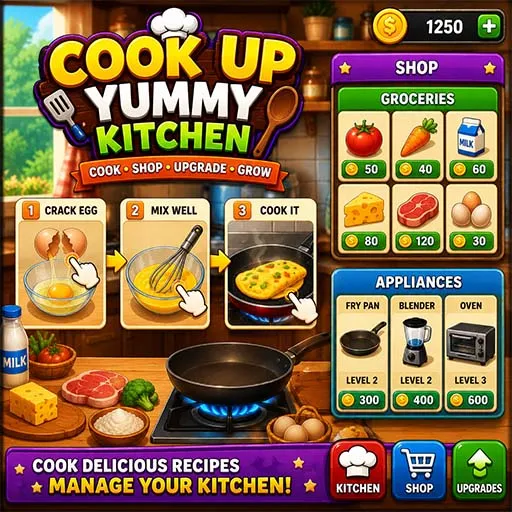
- Cook Up Yummy Kitchen: a chef game built around kitchen tasks.
- Cook Chinese Food: a recipe game with a world food theme.
- Fruit Juice Maker: a fresh and simple game for younger players.
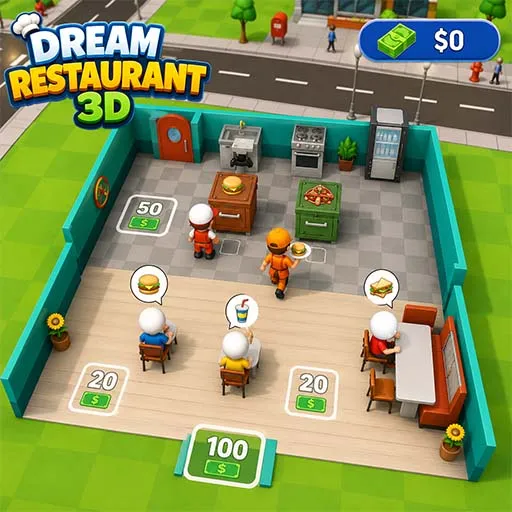
- Dream Restaurant 3D: a restaurant game with a 3D look.
Open each product page to see real screenshots, platform support, and file details before you buy.
What to Check Before You Buy On Source Plunge?
A solid foundation is a source code project for a cooking game. It is not always a finished, store-ready app. A few simple checks can save you days of work later.
Look at these points first:
- Unity version: Does it match the version you use?
- Complete or partial source code: Ensure that you obtain the entire project.
- Supported platforms: Check Android, iOS, and WebGL.
- Included assets: See which art, sounds, and UI files are in the package.
- Project file size: A big project may need more time to download and open.
- Plugins or utilities that are necessary: Certain projects require additional packages.
- Ad setup: See if AdMob or other ads are already added.
- Ease of reskinning: Check how simple it is to change art and text.
- Demo or preview: A demo shows you how the game feels.
- Documentation: Setup notes help beginners a lot.
- Last update date: A newer project is easier to work with.
- Seller support: Know how to ask for help.
- Price information: Verify that you are aware of what you are paying for.
Source Plunge allows you to compare projects before making a payment by displaying product specifications on each listing.
Licensing and Usage Rights
Know what you can do with the code before making a purchase. Among the most crucial steps is this one.
Ask yourself these questions:
- Can I publish the game under my own name?
- Can I use it in one game or in many games?
- Can I use it for client work?
- Can I resell the raw, unchanged files?
Source Plunge does not allow you to resell the source code as it is. Licenses are different from one listing to another, so read the terms on the product page. If something is not clear, ask the seller before you buy. A good seller will answer happily.
Supported Platforms and Technical Details
Mobile games use a lot of Unity's cooking templates. Some can be developed for the internet as well. Examine the product site for specific support.
- Google Play Store: the main home for Android cooking games.
- Apple App Store: for iPhone and iPad players.
- WebGL: for browser games on websites and game portals.
Also check screen size, game orientation, and the Unity version. Don't assume that platform support can vary from project to project. Read the listing.
Monetization Methods
A monetization-ready cooking game gives you a head start if you want to earn. Cooking games fit ads and rewards very well, because players naturally want more coins, more tools, and more time.
Common ways to earn include:
- Banner and interstitial ads: shown in menus or between levels, where AdMob is integrated.
- Rewarded ads: players watch a short video to get extra coins, hints, or a bonus ingredient.
- In-app purchases: new kitchens, chef outfits, recipes, or level packs.
- Reskin and republish: use one base to make several themed games.
- Client projects: build a branded cooking game for a business or a brand.
Always test your ads before launch. Also follow the rules of the Play Store and the App Store, so your app stays safe and active.
How to Buy and Use This Game's Source Code?
Buying is simple. Follow these steps:
- Browse this category and open the games you like.
- Read the features, platform details, and file list.
- Check the license and usage notes.
- Click Shop Now and place your order.
- Download your project files.
- Open the project in Unity and follow the setup steps.
- Customize the art, sounds, and text.
- Test the game on your device.
- Publish it on the Play Store, App Store, or the web.
Source Plunge aims to make buying easy and prices affordable, so you can spend your time on your game, not paperwork.
Why Buy From Source Plunge?
Source Plunge is built for developers who want to find game source code and ready-made Unity projects in one place.
Key buyer benefits include:
- Live chat support
- One-time payment options
- Live demo for products where available
- A wide range of game categories, including Simulation Games, Hyper Casual Games, etc.
- Ready-made game projects
- Unity game source code
- Customization and reskin opportunities
- Developer-focused product information
- Support before making a purchase decision
If you are unsure whether a project has a specific feature, platform, license, or monetization system, contact support before purchasing.
FAQ's
Basic Unity knowledge helps. Beginners can still do simple reskins by changing images, sounds, and text.
It can, if you do not change anything. That is why a good reskin matters.
Yes, if you follow each store's rules. Change the name, icons, and branding to make the app your own.
Read the documentation first. Then contact the seller and explain your problem clearly.
Commercial use depends on the license attached to the specific product. Always read the license terms before using the source code in a commercial game.