
Open World Survival Games
Buy open-world survival game source code at a fair price. Source Plunge offers Unity survival game templates with C# files, game assets, and a complete project. Test the live demo, check platform support for Android, iOS, and WebGL, then customize the game, add AdMob ads, and publish on the Play Store or App Store.


About Open World Survival Games
Want to launch your own survival game without building it from scratch? This page is made for you.
Here you will find ready-made Unity projects where players explore big maps, fight danger, and try to stay alive. C# source files are included with every project so you can view, modify, and customize it. App owners, small studios, and solo developers all shop here.
Building a 3D survival game from scratch can take many months. A complete game project cuts that time down. You choose a template, change the look, set up your ads, and publish. Source Plunge is a trusted marketplace for buyers who want a fast and simple start.
What Is Open-World Survival Game Source Code?
Open-world survival game source code is the full set of files behind a game where the player moves freely in a big world and must survive. Think of it as a house with the keys, the map, and the tools all handed to you. You get the scripts, scenes, and project setup, so you can build the game on your own computer.
In these games, the player is not stuck on one small level. They can walk, drive, fly, or fight across a wide area. They face enemies, manage health, and choose where to go next. That is why the health system and the survival mechanics sit at the center of the code.
When you buy from Source Plunge, you get a Unity project. You open it, read the C# scripts, and make the necessary changes. Swap the characters, colors, sounds, and menus. The working base stays the same.
Key Features of Our Open-World Survival Games Template
Every project is different, so always read the product page first. These are the features this category usually focuses on:
- Open-world gameplay: free movement across a large play area.
- Survival mechanics: the player must stay alive against enemies and danger.
- Health system: health changes during play, and the player must manage it.
- 3D game design: 3D models, scenes, and camera views.
- C# game source code: readable and editable scripts.
- Complete game project: open it in Unity and start working.
- Game assets included: models, sounds, and UI where listed.
- Customizable setup: change art, themes, and menus.
- Platform support: Android, iOS, and WebGL where listed.
- Monetization-ready: AdMob integration where the project supports it.
- Live demo available: test the game before you pay.
- Reasonable price: far lower than hiring a full team.
Some projects offer more, and some offer less. The ultimate say is always on the product page.
Best Open-World Survival Games in This Category
These are a few of Source Plunge's most popular projects at the moment:
- Giant Monster Worm Survival Game: a creature survival game with a simple, exciting goal
- Helicopter Shooting and Survival Battle: an action game with shooting and fast play
- Real Gangster Crime City: a 3D city game with an open-world feel
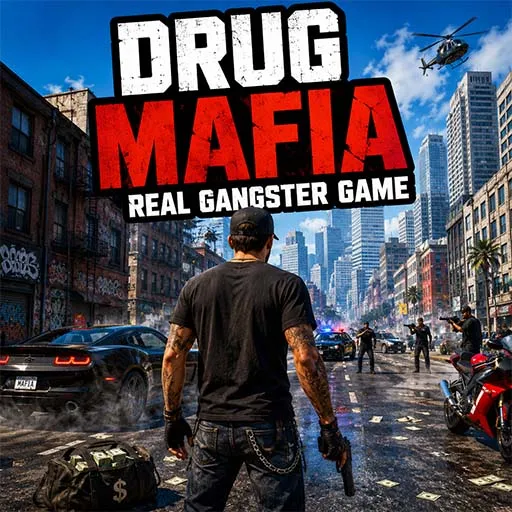
- Drug Mafia Real Gangster Game: a gang-themed action project with mission-style play
Open each page, watch the demo, and read the file list. Compare two or three games before you buy. A few minutes of checking can save you days later.
What to Check Before You Buy On Source Plunge?
A good purchase starts with a good checklist. Look for these on the product page:
- Unity version used in the project
- Full source code access
- Supported platforms
- Project file size
- Included art, sounds, and assets
- License terms
- Customization options
- Build requirements
- Ad and in-app purchase setup
- Live demo or video preview
- Update history
- Developer support
- Live Chat support
- One-time payment
If anything is missing, ask before you pay. One short message saves a lot of trouble.
Licensing and Usage Rights
Know your rights before you pay. Each product page displays the type of licence. In simple words:
- Single-project license: use the code for one game.
- Multi-project license: reuse the code across more than one app or client project.
- Your finished version: after you change and rebuild the game, you can publish your version.
- No reselling as-is: you cannot sell the original files again in raw form.
Terms can change from game to game. Always read them before checkout.
Where Can You Publish After Buying?
After you buy from Source Plunge, you can take your build live on:
- Google Play Store for Android players.
- Apple App Store for iPhone and iPad players.
- WebGL for websites and web game portals.
- Third-party game portals for extra reach.
Not every project supports every platform. Check the export notes on the product page before you plan your release.
Who Should Buy Open-World Survival Game Source Code?
- First-time app owners who want to publish a game fast.
- Unity developers who need a solid base to build on.
- Small studios that handle client work and need a quick start.
- Game publishers who want to reskin and release many games.
- Students who want to learn how survival mechanics and a health system work.
Monetization Possibilities
Making money is easier with a monetization-ready project. Depending on the game and license, you can use:
- AdMob integration for banner and full-screen ads.
- Unity Ads where the project supports them.
- Rewarded ads so players can watch a video for a bonus.
- In-app purchases for items, packs, or upgrades.
- Cosmetic items like skins and themes.
- Ad-free upgrade for players who dislike ads.
Think of the player first. A fair game with smart, small ads keeps players longer than one full of pop-ups.
How to Buy and Use Open-World Survival Game Source Code?
Buying is easy. Here is how it works:
- Browse the games on this page.
- Open a product page and read the feature list.
- Watch the live demo or preview.
- Check the Unity version, platforms, and license.
- Click Buy Now and finish checkout.
- Download your source code files.
- Open the project in Unity and start customizing.
Ready? Pick a game above and shop now.
FAQ's
Yes. Most projects let you swap art, sounds, and colors. The amount of work depends on the game.
Basic Unity skills help a lot. Small changes like art and ads need little code. New features need some C#.
Yes, if the project supports those platforms. Check the export notes first.
Each page shows the Unity version used. If yours is different, you may need to upgrade the project.
Contact the Source Plunge team and share your Unity version and the error you see. Clear details get faster help.
Commercial use depends on the license. Read the license terms to understand whether you can publish the game, modify the code, use the assets commercially, and distribute the finished product.